All you need to know about Image AI model, Seedream 5.0 (opens in new tab)

Seedream 5.0 by ByteDance helps you produce bold visuals with precise control. Create high-quality AI images or refine existing ones inside Artlist’s AI Toolkit.

Seedream 5.0 AI runs inside Artlist’s AI Toolkit, combining text-to-image and image-to-image workflows in one place.
Open the AI Toolkit and select Seedream 5.0 from the available image models.

Write a text prompt describing the image you want, or upload reference images to guide composition, style, and color.

Create your image, then refine it with text prompts or additional references.

Seedream 5.0 AI image generator is designed for creators who want to create high-resolution visuals with more control.

Design eye-catching thumbnails, channel art, and visual assets that boost engagement.
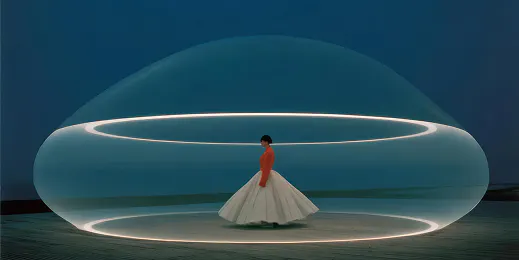
Develop distinctive campaign visuals and concept-driven imagery in 2K, 3K or 4K for social media, advertising, and branded content.

Generate stylized pre-visualization frames, mood boards, concept art, and title cards that support visual storytelling.
Experiment with prompts and visual references to see how Seedream 5.0 fits your creative process.

The Seedream 5.0 image model combines structured prompting with flexible outputs for professional image creation.
Use multiple reference images at once to guide composition, style, and color. The @image syntax allows you to blend visual influences more accurately.
Create original visuals from detailed prompts. Clearly describe subjects, lighting, camera perspective, and typography for precise outputs.
Upload images and apply stylistic adjustments, compositional changes, or full visual transformations.
Generate images in native 2K, 3K, and 4K across square, portrait, and landscape formats — suitable for YouTube, Instagram, TikTok, broadcast, and print.
Create bold, stylized visuals for campaigns, products, and creative projects. Seedream 5.0 helps you move from idea to finished assets faster, with more control over the final look.
Explore guides and tutorials to improve your AI image generation and editing skills.
Seedream 5.0 is a production-ready AI image generator developed by ByteDance. It’s designed for creators who want precise control over stylized and imaginative visuals. The model supports both text-to-image generation and image-to-image editing, including structured multi-reference workflows.
Yes. Seedream 5.0 is accessible as part of Artlist's free trial. Sign up to try the model's latest generation capabilities, experiment with commercial-use AI images, and see how it fits your creative workflows. See what's included in the free trial here.
Seedream 5.0 combines strong prompt adherence with powerful multi-reference control, flexible aspect ratios, and high-resolution 2K, 3K, and 4K outputs. It enables precise creative direction across text-to-image and image-to-image workflows. Seedance 5.0 is especially effective for stylized, imaginative visuals and structured creative projects that require consistency and control. Learn how Seedream 5.0 works step by step in our Help Center guide.
By reusing prompts and reference images, Seedream 5.0 can maintain recurring elements such as characters, logos, or brand colors across images. This makes this AI image generation model extremely reliable for creating cohesive campaigns and serialized content.
Seedream 4.5 focuses on realism, cinematic lighting, and visual consistency. Seedream 5.0 is built for stylized visuals, creative exploration, and flexible control across multiple references.
Yes. ByteDance also develops AI video generation tools, including Seedance 2.0 and Seedance 1.5 Pro. These models extend creative workflows into motion content, supporting projects beyond still imagery.
Still have questions? We're here to help.

